How Does LegalTime AI Compare to SurePoint Competitors?
Quick Answer
LegalTime AI differs from SurePoint by automating time capture from multiple desktop sources and integrating with many billing systems, while SurePoint's time tracking details are less public. LegalTime AI runs on Mac and Windows desktops and drafts AI-powered entries for review.
What is the biggest difference between LegalTime AI and SurePoint?
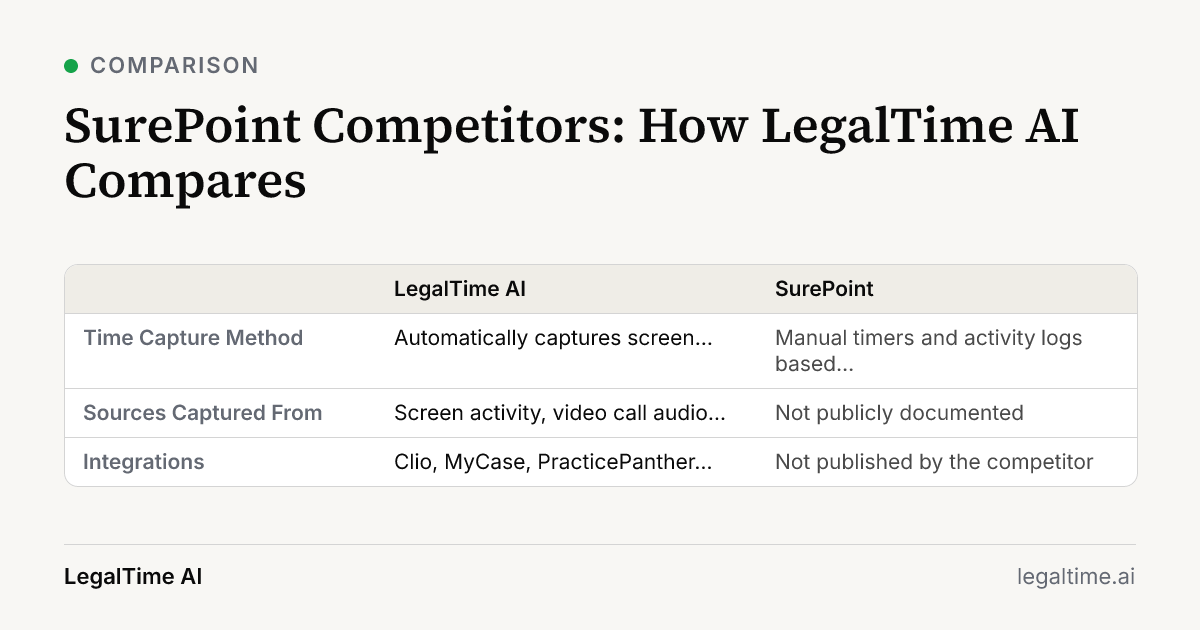
The biggest difference is LegalTime AI's automatic capture of billable work from multiple desktop sources including screen activity, call audio, email, and calendar, while SurePoint’s detailed time capture methods are not publicly documented. LegalTime AI drafts time entries using AI, which you review before sending to billing. SurePoint focuses on traditional time tracking but does not publish full details on integrations or AI drafting.
How do LegalTime AI and SurePoint capture billable time?
SurePoint uses manual timers and activity logs based on user input, which requires attorneys to start and stop timers during their work. LegalTime AI runs in the background on Mac and Windows desktops, automatically capturing screen activity, call audio transcription, sent emails from Gmail or Outlook, and Outlook calendar events, reducing missed time without manual timers.
This automatic capture suits busy attorneys who often forget to track time. SurePoint’s manual approach relies on consistent user engagement.
What integrations do LegalTime AI and SurePoint offer?
LegalTime AI connects with nine major billing platforms including Clio, MyCase, PracticePanther, Smokeball, Harvest, LeanLaw, Actionstep, Sage Timeslips, and TimeSolv. It reads billing codes and writes approved time entries directly.
SurePoint’s public information on integrations is limited and does not confirm connections with these major billing systems. This can affect firms needing broad compatibility with existing software.
Which platforms do LegalTime AI and SurePoint support?
LegalTime AI operates as a desktop app for Mac (macOS 12 or later) and Windows, running in the background while you work. It does not have a mobile app.
SurePoint’s platform support details are not fully published, but it typically offers Windows support and web access. LegalTime AI’s desktop focus means it captures rich activity data unavailable on mobile, which is critical for accurate time capture.
What about security and data handling for LegalTime AI and SurePoint?
LegalTime AI sends extracted text and screenshots to AI models with zero data retention, ensuring client content is not used to train shared models. It is not SOC 2 certified yet, but a SOC 2 Type II examination is underway.
SurePoint does not publicly disclose detailed security practices or SOC 2 certification status. Firms with strict data security requirements should verify these aspects directly.
Does LegalTime AI integrate with SurePoint?
LegalTime AI does not list SurePoint among its integrations. The honest comparison is SurePoint’s built-in time tracking versus adding LegalTime AI on top. Firms can choose to use LegalTime AI alongside SurePoint for more automated capture, but LegalTime AI is not a replacement for SurePoint.
Key facts
- The average law firm utilization rate in 2025 was 38%, meaning lawyers captured 3.0 billable hours in an average 8-hour work day. [source]
- LegalTime AI captures billable work automatically from screen activity, call audio from video calls, sent email (Gmail or Outlook), and the Outlook calendar.
- LegalTime AI connects to Clio, MyCase, PracticePanther, Smokeball, Harvest, LeanLaw, Actionstep, Sage Timeslips and TimeSolv billing systems.
Frequently asked questions
Can LegalTime AI replace SurePoint’s time tracking completely?
No. LegalTime AI does not integrate directly with SurePoint. You can use LegalTime AI alongside SurePoint to automate time capture, but LegalTime AI is not a direct replacement for SurePoint’s built-in tracking.
How does LegalTime AI handle time entry drafting compared to SurePoint?
LegalTime AI uses AI to draft time entries from captured data for your review and approval. SurePoint relies on manual entry or timers without AI drafting capabilities publicly documented.
What billing systems does LegalTime AI work with that SurePoint may not?
LegalTime AI integrates with Clio, MyCase, PracticePanther, Smokeball, Harvest, LeanLaw, Actionstep, Sage Timeslips, and TimeSolv. SurePoint’s public integration information is limited and may not cover all these platforms.
Does LegalTime AI have a mobile app like SurePoint?
LegalTime AI is only available as a desktop app for Mac and Windows. It does not have a mobile app. SurePoint offers web access and possibly mobile options, but exact details should be checked with SurePoint.
Is LegalTime AI secure for sensitive client data?
LegalTime AI sends data to AI models with zero data retention and does not use client data to train shared models. It is undergoing a SOC 2 Type II security examination. SurePoint’s security certifications are not publicly detailed.
Related reading
Stop losing billable time.
LegalTime AI captures every minute automatically inside Clio.